The Collaboration Network for Creative Teams
A photoshoot is rarely one person's work — it takes a photographer, a model, and often a makeup artist, a stylist and a retoucher. CLOS lets that whole team form around a shoot and work it together in one browser room, even when nobody shares a city.
Short answer
A photography collaboration network connects the people a shoot needs — photographer, model, makeup artist, stylist, retoucher — around mutual intent instead of cold outreach. In CLOS, collaborators match through Discovery, then the whole team joins a browser room for the session itself: up to 8 people on Pro watch every frame land live and give feedback in real time, wherever each of them happens to be.
Key takeaways
- Match on mutual intent — Discovery profiles exist because their owners want to collaborate; a mutual like opens the chat
- The whole team in one room — everyone joins from a browser link, no install; Pro rooms hold up to 8 viewers
- Feedback on live frames — instant previews land in the room as they are shot, so the MUA, stylist and retoucher react before the next frame
- TFP or paid, city-free — trade collaborations where everyone keeps the images, run remotely across any distance

How a distributed creative team shoots together
The old blocker for creative collaboration was logistics: five busy people, one studio, one afternoon that works for everyone. CLOS removes the studio from the equation — the team assembles online and the shoot happens in a shared virtual room.
Assemble the team
Match your core collaborators in Discovery — browse profiles, like the work that fits your concept, and chat when the like is mutual. Then invite the rest of the team — MUA, stylist, retoucher — to join the session.
Everyone joins the room by link
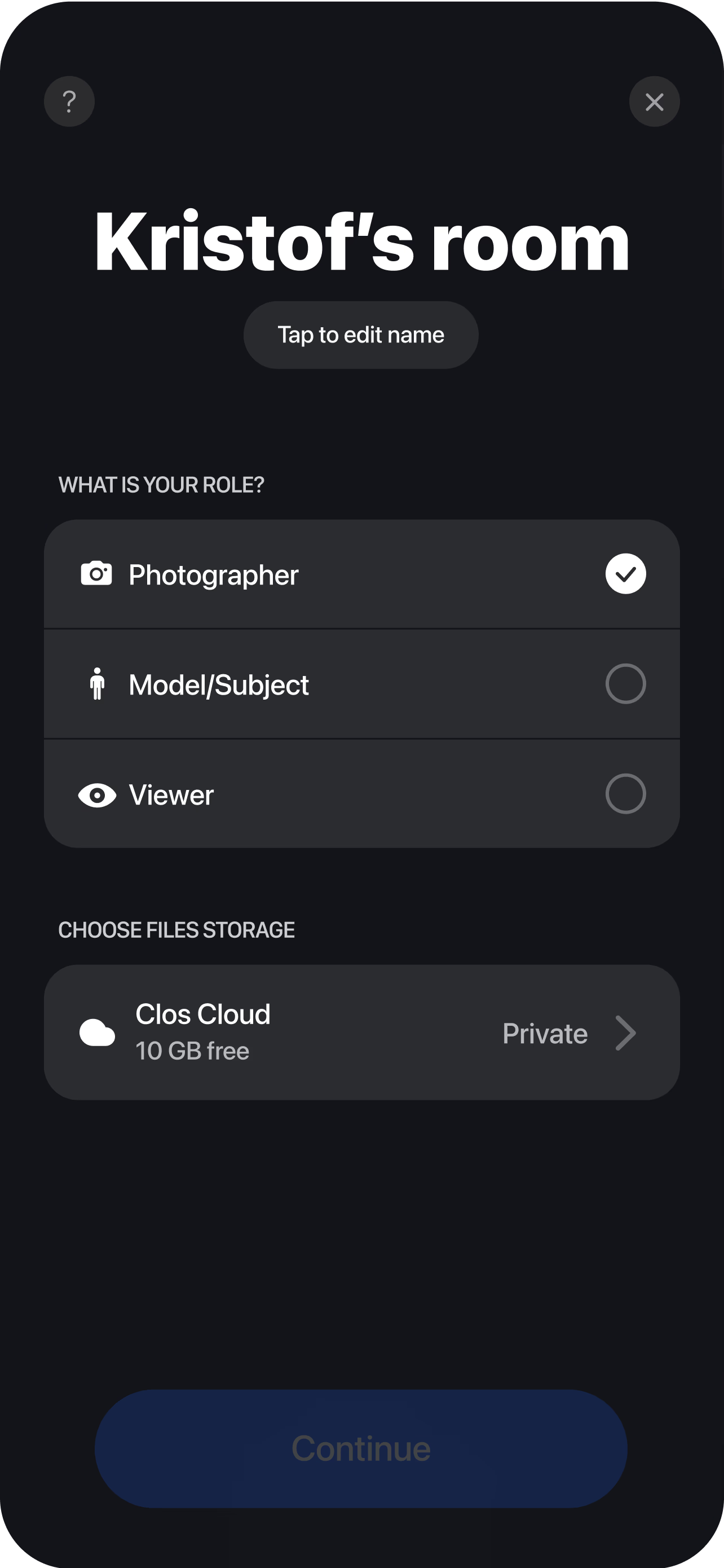
The photographer opens a virtual room and shares a browser link. Only the phone doing the capturing runs the CLOS app — everyone else joins from any browser, no install, over an end-to-end encrypted connection.
Shoot with live team feedback
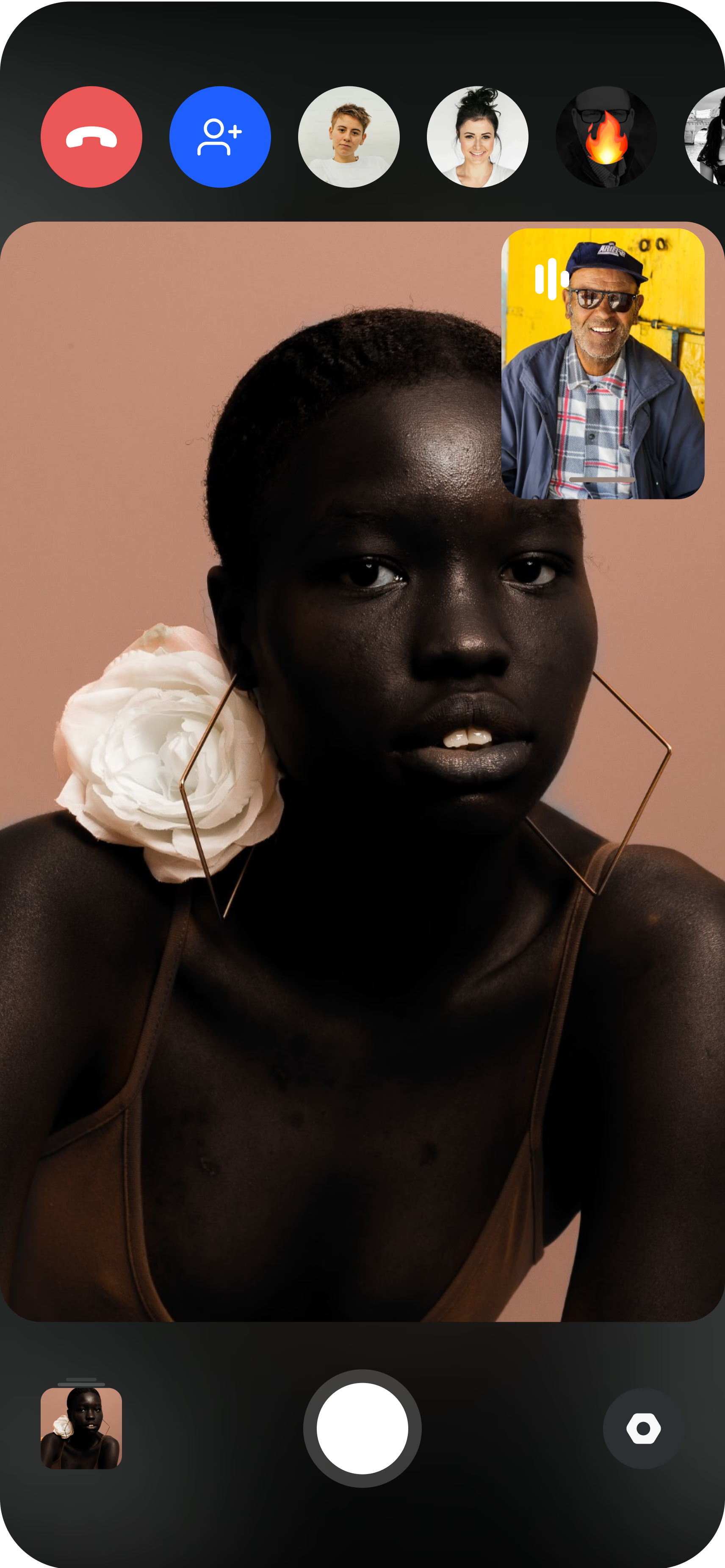
The photographer directs the camera remotely while instant previews land in the room for everyone. The stylist flags a crease, the MUA calls a touch-up, the retoucher notes what to fix in post — then full-resolution files follow through cloud delivery.
That third step is what no message thread or mood board can replicate: the whole team seeing the actual frames as they are shot. Instead of the photographer describing the light or forwarding phone snaps after the fact, real-time cloud delivery puts instant previews in front of every viewer in the room — and the full-resolution files follow, ready to download as a ZIP when the session wraps.
Why a collaboration network beats cold outreach
Most creative teams are assembled by cold DM: a photographer messages twenty makeup artists on Instagram, hears back from three, and hopes one still replies when the date approaches. The failure rate is built in — you are pitching people who never said they wanted to be pitched.
Discovery reverses the direction of intent. Every profile on it — photographers, models, or any creative — was created by someone who wants to collaborate, with their portfolio attached. You judge the work before you like; they judge yours the same way. A mutual match means both sides have already said yes to each other’s craft, which is why matched collaborations turn into booked sessions instead of ghosted threads. From there, the chat is where the team takes shape: concept, references, roles, and who else to bring in.
TFP creative teams: everyone works, everyone keeps the images
Editorial-style tests have always run on trade. In a TFP collaboration, nobody pays and everybody keeps the finals: the photographer adds an editorial set to the book, the model gets new looks, the MUA and stylist get published-quality images of their work, and the retoucher gets before/afters with a real credit. It is the standard way whole creative teams build portfolios together.
CLOS makes the trade worth everyone’s time because the files are real captures from the phone’s sensor — full-resolution JPG on every plan, RAW (DNG) and ProRaw on Pro — never screenshots, never AI. Agree the terms in chat before the session: how many finals, who retouches, and where each person may publish.
No shared city required
The best MUA for your concept might be in Milan, the model in Mexico City, the retoucher three time zones away. In a location-bound workflow that team never forms. In CLOS it does: the model’s phone is the camera, the photographer directs framing, focus and exposure from a browser, and everyone else watches from wherever they are. The same setup powers full remote fashion photoshoots — a distributed team producing lookbook and editorial work without a single flight.
Distance stops being a constraint and starts being a feature: different cities mean different faces, locations and light, so a networked team’s portfolio reads broader than any local circle could.
Who uses this
- Photographers building a team — a repeatable circle of collaborators instead of one-off shoots; see how CLOS fits photographers.
- Makeup artists adding published, editorial-grade work to their book by joining test shoots as they happen.
- Stylists who want their pulls photographed well — and a live say in how each look is framed.
- Retouchers building relationships with photographers by joining sessions and seeing files the moment they land.
- Models growing their portfolio through team tests — see how CLOS works for models.
Frequently asked questions
What is a photography collaboration network? +
Can makeup artists, stylists and retouchers join? +
How does an unpaid team collaboration work? +
Does everyone on the team need the CLOS app? +
How many people can watch the shoot live? +
What does it cost to run a team shoot on CLOS? +
Related
- Discovery — collaborator matching
How the swipe-style matching feature works.
- Remote fashion photoshoots
A distributed team producing lookbook and editorial work.
- Guide: TFP photography
How trade collaborations work and how to agree terms.
- Virtual rooms
The browser room where the whole team watches the shoot.
Build your creative team on CLOS
Match your next collaborators in Discovery, get the whole team into one browser room and shoot together — no shared city, no installs for viewers. Free to start.